Device-Level Data Groups
The ScanCom EIE offers the ability to add data groups on an ad hoc basis to a device instance, without configuring them first in the device template file. This functionality is handled with the Device Specific Data data group. Any number of device-level data groups can be added.
To Configure a Device-Level Data Group
- Open CygNet Explorer and navigate to the DDS containing the device.
- Double-click the device name in the DDS pane.
- Navigate to the Data Group page.
- Click Add, then select Device Specific Data, and click OK.
- Click Configure Data Group in the Properties dialog box. This displays the data group definition dialog box in which elements can be added and configured.
- Configure the data group using the functionality described in the following table, then click OK to save the data group definition.
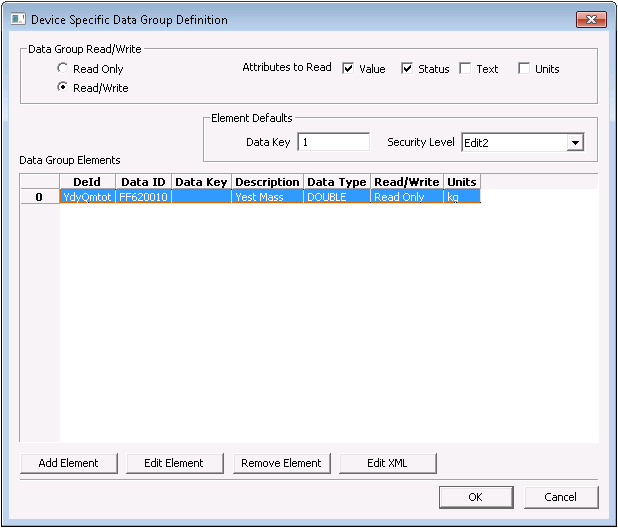
|
| Sample Device-Specific Data Group Dialog Box |
Device-Level Data Group Definition Properties
The following table lists and describes properties on the Device-Level Data Group Definition dialog box.
| Property | Description |
|---|---|
|
Read Only, Read/Write |
The direction of the data group |
|
Attributes to Read |
The attributes to return for each data group element. A status attribute will apply error handling to the value. Text may or may not be implemented for a particulardata group element on the device. |
|
Data Key |
The default data key for the data group elements. Can be overridden in element properties. Data keys are a method of assigning ordinals to data group elements in situations with multiple components (for example, meter runs) so data can be referenced from the correct component. Data that pertains to the entire device (for example, date/time) has a data key of 0. |
|
Security Level |
The default security level used when reading/writing data group elements. Can be overridden in element properties. |
|
Add Element |
Click to select a data group element to add to the list. |
|
Edit Element |
Click to define properties for the data group element, including description, units, and display mask, as well as overrides of default settings. |
|
Remove Element |
Click to remove the element from the list. |
|
Edit XML |
Shows an XML representation of the data group as currently defined, in the device template file format. Changes can be made directly to the XML. |


